


TuneCarry: Offline Music
3.60.00 Reviews
App Specs
- Version
- 1.0.1
- Updated On
- License
- Free
- Downloads
- 100,000+
- Developer
- Photos & Videos Download Tools
- Categories
- Music & Audio
- Platform
- Android
Screenshots
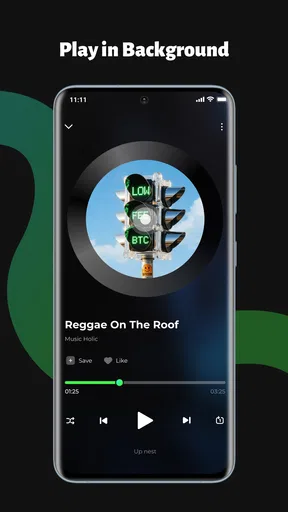
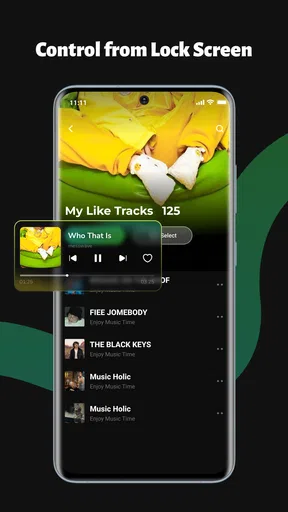
 Analysis by AppCompare
I found TuneCarry: Offline Music most useful when I treated it as a simple personal music shelf rather than a replacement for a streaming service. Its purpose is clear: keep songs stored locally, arrange them into playlists or folders, and control playback from the lock screen. That focused approach makes it appealing for people who already have music files and want a calmer way to listen without depending on an internet connection.
My overall view is positive but measured. TuneCarry is at its best when organization and offline access matter more than discovery. It does not try to turn a local collection into a social platform or an endless recommendation feed. Instead, it gives your own music a more practical home on a phone. That simplicity is a strength, although it also means listeners who rely on streaming catalogs, automatic recommendations, or cloud synchronization may find it too limited.
How TuneCarry handles a personal offline library
The app belongs to the Music & Audio category and is developed by Photos & Videos Download Tools. It is free to use, carries an Everyone content rating, and has reached over 100 thousand installs. Its current version is 1.0.1, and it runs on Android eight or later. Those details place it within easy reach of many Android users, especially anyone using an older phone that still handles local playback comfortably.
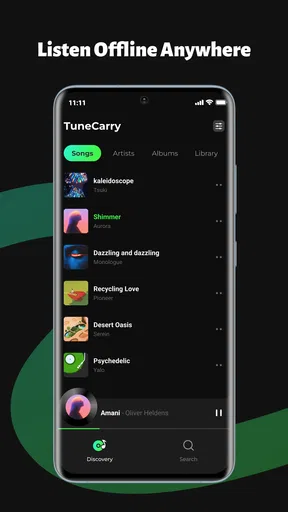
What I like first is the distinction between listening to music I own or have already saved and browsing a service that constantly asks me to choose something new. With TuneCarry, the starting point is the collection already on the device. That changes the listening routine: instead of searching through a huge online catalog, I can open a familiar playlist, select a folder for a particular mood, or continue with songs I deliberately kept available.
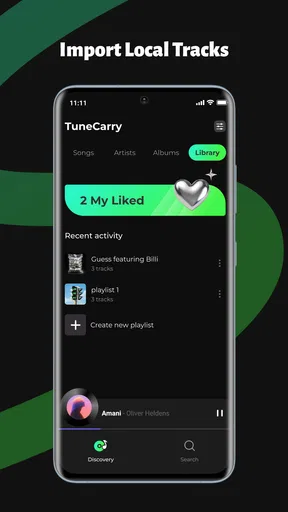
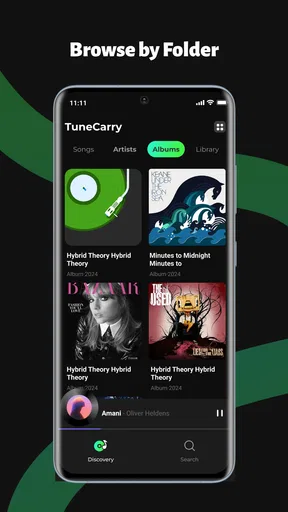
The folder approach is more useful than it may sound. Playlists are ideal for an intentional sequence, such as a workout or a long trip, while folders can reflect the way files are already arranged on a phone. I would use separate folders for albums, language, or activity, then reserve playlists for combinations that change often. This avoids the common problem of forcing every track into one organizational system.
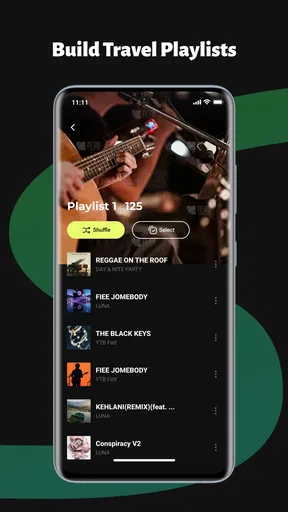
A practical workflow is to prepare the collection before leaving home. I would check that the files I expect to hear are present, group them by purpose, and make one compact playlist for situations where I do not want to browse. That is especially helpful during travel, in places with unreliable reception, or when I want to reduce mobile data use. The app’s value comes less from a dramatic feature and more from making this preparation feel like a normal listening habit.
Lock screen controls make short listening sessions easier
Lock screen controls are an important part of the experience because music listening rarely happens while the phone is being held open. I can start playback, put the device away, and handle basic changes without returning to the full app every time. That suits small moments such as walking to a store, cooking, or moving between rooms.
Worth Reading Before You Choose

Flipboard Shows What News Apps Must Do Beyond the Feed

Switching to Android Auto Means Rethinking Your Driving Routine

Google Calendar Makes a Crowded Week Easier to Manage

Ludo King Makes the Most of the Minutes Between Plans

Baby Panda World Brings Quick Play to Modern Phones, but Its Game Library Feels Busy

ESPN’s Live Game View Makes Following Close Games Easier
This also changes how I judge a local player. A basic file list is not enough if playback becomes awkward once the display turns off. The lock screen controls make TuneCarry feel more like a proper everyday player instead of a utility that happens to open audio files. I would still keep the phone accessible when reorganizing a library, but ordinary play, pause, or track changes should fit naturally into a hands-free routine.
One useful habit is to create a playlist for each situation where lock screen control matters most. A short commute list, a concentration list, and a longer travel list reduce the need to unlock the phone and search while moving. This is a small workflow improvement, but it is exactly the kind of detail that makes an offline app easier to keep using.
Where the focused design is stronger than streaming alternatives
Compared with a typical streaming service, TuneCarry gives me more control over what is available offline because the collection is based on local songs rather than a rotating online catalog. There is no need to browse recommendations when I already know what I want. For someone with carefully selected albums, recordings, or downloaded tracks, that can feel faster and less distracting.
It also avoids a common streaming compromise: an offline library can depend on account status, service availability, or periodic access checks. A local player is more direct. Once the music is on the phone, the listening experience is centered on those files and the way they are arranged. That makes the app attractive to people who want a predictable collection rather than a subscription-centered music routine.
Against a more advanced desktop-style music manager, however, TuneCarry’s appeal is its lower level of commitment. I would not choose a complicated organizer merely to play a few folders on a phone. TuneCarry makes sense when I want a lightweight mobile front end for an existing collection. The trade-off is that users who need extensive tagging, detailed library management, or a carefully synchronized multi-device setup may prefer a more specialized solution.
The main weakness is the dependence on a prepared local collection
The same focus that makes the app clear can also make it feel narrow. TuneCarry is useful only when I already have local songs ready to play. It does not solve the problem of discovering new artists or filling an empty library. Someone who expects to install an app and immediately search a broad music catalog will be looking for a streaming service instead.
There is also a maintenance cost that streaming users may not expect. Local music requires attention: files need to be placed on the device, folders need to stay understandable, and playlists can become outdated when the collection changes. If I move or remove tracks outside the app, my organization may need tidying again. That is not a flaw unique to this player, but it is an important part of choosing this style of listening.
I would also be cautious about building an elaborate system too quickly. A folder for every tiny mood can make browsing slower rather than easier. My better approach would be to begin with a few broad groups, then add playlists only when a repeated listening need appears. The app rewards sensible preparation; it cannot compensate for a chaotic file collection by itself.
Another limitation is the likely gap between a focused player and a full music ecosystem. If I want synchronized favorites, shared playlists, artist radio, or discovery based on listening history, I would choose a different category of app. TuneCarry’s local-first character is valuable precisely because it leaves those distractions out, but that means it is not a universal answer for every listener.
Everyday situations where TuneCarry earns its place
Imagine preparing for a train journey through areas where reception may be inconsistent. I could place a few albums in a travel folder, build one playlist for the first part of the trip, and rely on lock screen controls once the phone is in my pocket. The useful part is not just avoiding buffering. It is knowing that the selected music will remain available without having to repeatedly check a streaming download or search for a signal.
Another good scenario is a phone used by someone who prefers a fixed collection. A parent might keep familiar songs in clearly named folders, while a person who listens to independent recordings could organize personal files without mixing them into an online service. In both cases, the app supports a deliberate library instead of pushing the listener toward constant browsing.
I can also see value for conserving attention. When I am working, I may want a playlist I already trust rather than an algorithm offering new choices. Opening a local list and using the lock screen controls keeps the task small. That is a genuine advantage for people who find large streaming catalogs distracting.
On the other hand, I would skip it if my music life is mostly online. If my favorite artists are spread across services, if I frequently discover music through recommendations, or if I expect one library to follow me automatically across devices, the local-file model will feel like extra work. In that situation, a streaming app with strong offline downloads is the more convenient choice.
Practical ways to get more from the app
My first recommendation is to organize before importing or opening the player repeatedly. Clear folder names make a bigger difference than a large number of narrowly defined playlists. I would use folders for stable groups, such as albums or broad activities, and playlists for temporary combinations. This keeps the collection readable as it grows.
Second, I would create one “default” playlist for moments when I do not want to make a decision. It should contain dependable tracks rather than every favorite song. That list becomes especially useful with lock screen controls because it reduces the need to unlock the phone and navigate through several folders.
Third, I would review the collection occasionally. Removing duplicates, correcting confusing names, and separating unfinished downloads can make local playback feel much more polished. This is an overlooked trade-off: the app can provide a clean listening experience, but the quality of the library still depends on the care taken before playback begins.
Finally, I would test the exact folders and playlists I plan to use before a flight, trip, or long offline period. Offline listening is most valuable when it is predictable. A quick check helps catch an incorrectly placed file or a playlist that no longer matches the collection, without turning the journey itself into troubleshooting time.
Who should install it, and who should look elsewhere?
I would recommend TuneCarry to Android listeners with a local music collection who want straightforward playback, folders, playlists, and lock screen access in one focused app. It is particularly suitable for people who value offline reliability, prefer choosing their own music, or want to keep listening separate from recommendations and subscriptions.
It is also a sensible option for someone who finds full streaming apps excessive. If the main requirement is “play my songs and let me control them while the phone is locked,” the app’s narrow purpose works in its favor. The free price makes it easy to try without committing to a paid music service, while the Everyone rating keeps its audience broad.
I would not make it my first choice for a listener who needs a complete music ecosystem. Users looking for discovery, cloud-based continuity, collaborative playlists, or a huge searchable catalog will probably be happier with a streaming alternative. Likewise, people who dislike managing files may find the local-library responsibility frustrating rather than empowering.
The public response is respectable rather than overwhelming, with a 3.8 average from 43 ratings. I read that as a sign to keep expectations realistic: this is a focused utility, not a feature-heavy platform trying to satisfy every kind of listener. Its success depends on whether its simple job matches the way you already keep music.
My final take on TuneCarry
After using it as a local player, I see TuneCarry as a practical companion for a specific listening style. It gives personal files a more usable structure, makes offline sessions easier to prepare, and keeps basic playback reachable from the lock screen. Those strengths are concrete, especially when internet access is uncertain or when I want to listen without opening a large, distracting catalog.
Its weakness is equally clear: it does not replace the discovery and convenience of streaming. The app asks me to bring the music and maintain the organization myself. For some listeners, that is the point. For others, it will feel like unnecessary housekeeping.
My recommendation is simple: choose TuneCarry if your music is already local and you want control without clutter. Start with a few well-named folders, build a small set of purposeful playlists, and use the lock screen controls for everyday listening. If that workflow sounds natural, the app is likely to become a dependable part of your phone. If you mainly want instant access to music you do not already own or store, a streaming-focused alternative will serve you better.
Pros
- Works without mobile data once songs are downloaded.
- Simple interface makes offline playback easy to manage.
- Useful for flights
- commutes
- and areas with weak signal.
- Can help reduce streaming data usage and battery consumption.
- Keeps music available when internet access is unreliable.
Cons
- Offline storage can consume considerable space on smaller devices.
- Downloaded tracks may need periodic checks or reauthorization.
- Music availability depends on the app’s supported catalog.
- Limited offline features may feel restrictive for advanced listeners.
- Switching devices may require downloading the music library again.
FAQs for TuneCarry: Offline Music
What is TuneCarry: Offline Music, and how does it work?
TuneCarry: Offline Music is designed for listening to music without relying on a constant internet connection. After adding or downloading supported audio files to your device, you can organize tracks into a personal library and play them offline. The app is especially useful for flights, commuting, travel, or areas with weak coverage, although available features may vary by device and app version.
Can I use TuneCarry: Offline Music without an internet connection?
Yes, offline playback is the main reason to use TuneCarry. Once your music has been stored locally on the device, you should be able to listen without mobile data or Wi-Fi. However, an internet connection may still be needed initially to download music, import files from cloud services, access certain online features, or complete account and subscription checks if those are required.
What music files and sources are supported by TuneCarry?
TuneCarry generally works with audio files that are compatible with the operating system and available through the app’s import or download options. Before installing, check the current store listing for supported formats and sources, since compatibility can differ between Android and iOS. The app should not be assumed to download copyrighted music from unauthorized services; users are responsible for having permission to use imported tracks.
Does TuneCarry: Offline Music include playlists and music organization tools?
The app is intended to make a locally stored music collection easier to manage, so users can typically expect basic organization features such as browsing tracks, creating playlists, and controlling playback. The exact tools may include search, favorites, repeat, shuffle, or sorting options, depending on the release. If advanced tagging, lyrics, equalizer controls, or cross-device synchronization are essential, verify that those features are specifically listed before downloading.
Is TuneCarry: Offline Music free to download, and are there in-app purchases?
TuneCarry may be free to install, but the availability of advertising, premium functions, subscriptions, or in-app purchases depends on the current version and platform. Some features can be limited until an upgrade is purchased, while others may remain available at no cost. Review the Google Play or App Store listing carefully for pricing, trial conditions, recurring billing, and refund information before confirming any purchase.


